What Gendora does
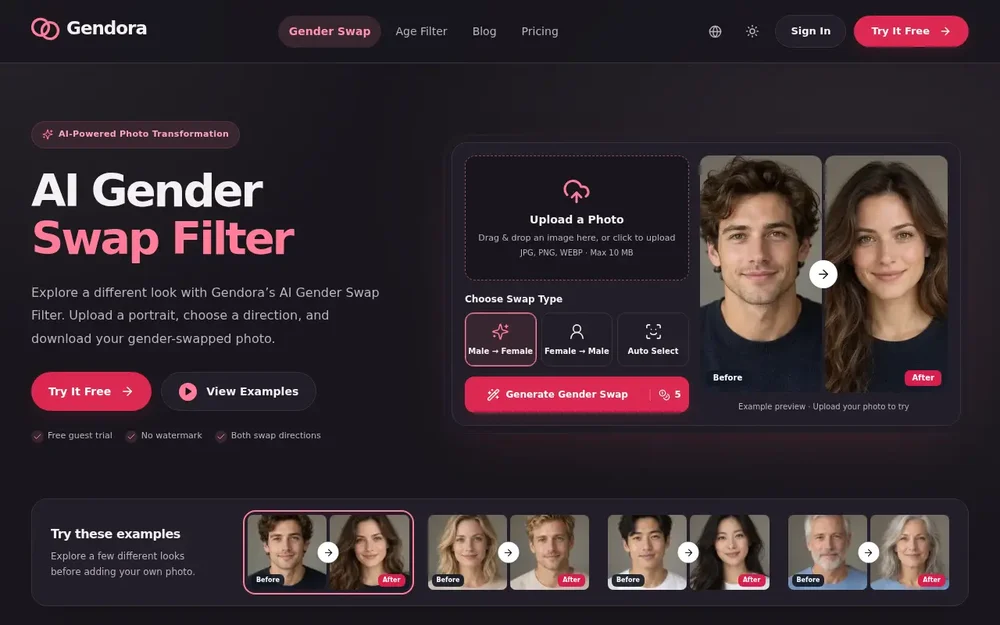
Gendora is a browser-based photo editor for creating an AI gender swap from a portrait. Upload an image, choose a male-to-female or female-to-male transformation, and download the generated result. The tool is for people who want to explore an alternate appearance, compare before-and-after portraits, or develop a visual reference for a creative idea. It works on still photos rather than videos, and the finished image is an imagined transformation—not a prediction of how a person would look in real life.
The editor uses generative AI to redraw parts of an image rather than simply placing a fixed face overlay on top. It aims to retain recognizable features, expression, and the original composition, while the resulting changes can extend to facial details, hair, and other parts of the scene. Preservation is not guaranteed, so each image should be reviewed alongside its source. Gendora also provides sample before-and-after portraits, making it possible to see examples before uploading a personal image.
Start by selecting a photo from your device or dragging it into the upload area. Gendora lists JPG, PNG, and WebP as accepted formats, with a maximum file size of 10 MB. Its guidance recommends a clear image with one adult and a visible face; a close, well-lit portrait gives the system more facial detail to work with than a distant or partly obscured face. Full-body photos are accepted too, although a small face may make the result less useful. For a group image, the editor does not offer a person selector, so its guidance is to crop each consenting adult into a separate photo before editing.
Next, choose the transformation direction. The two named options are Male → Female and Female → Male, and the page also displays Auto Select. Start the generation and leave the page open while the photo processes; once the result is ready, use the download control to save it. Gendora reports an average model processing time of 16 seconds for recent successful runs, but upload time and queueing can add to that. Output dimensions are selected automatically, with model support up to 3840 × 2160 pixels; the site notes that its highest resolutions are experimental.
What the result can—and cannot—preserve
Gendora presents the gender swap as a new rendering of the supplied image, not as a guaranteed change limited to a few facial features. Its stated aim is to keep a familiar face, expression, and composition while creating a masculine or feminine appearance. Lighting, pose, face visibility, and the original photo all affect the outcome, and the site gives no guaranteed accuracy rate for either direction. There is no strength slider: users select a direction, and the system determines the changes for that choice.
The editor asks the model to keep clothing and the surrounding scene, but generative editing can still alter details. Check the completed image before using or sharing it, especially if a particular expression, garment, or background element matters. Gendora’s examples show several kinds of before-and-after portrait changes, but those sample images are illustrations; results from an uploaded photo will vary. Comparing the output directly with the original is a practical way to judge which features have been retained and which have changed.
Ideas for using a gender-swapped portrait
A personal portrait can be a starting point for exploring an alternate presentation or simply seeing how a familiar face looks after a generative transformation. For character development, writers, game creators, and illustrators can use an edited portrait as a visual reference while considering an alternate appearance for an adult character. Cosplay planning is another possible use: a saved image can help someone think through hair, makeup, or costume ideas, without replacing their own decisions about the final look.
The result can also serve as a starting image for a profile-picture concept, virtual character, storyboard, or creative brief. Couples or friends may compare transformations using separate portraits, provided the people pictured agree to the edit. For a before-and-after clip, save the original and edited still images, then arrange them in a separate video editor; Gendora itself edits photos, not video. Similarly, its separate age-filter page can be used for another edit after saving a gender-swapped portrait. These are ways to use the downloaded image, not additional controls inside the gender swap editor.
Access, privacy, and practical considerations
Gendora offers a limited guest trial that can be used in a browser without registering or installing an app. The page advertises a free trial and no watermark. Continued use may require signing in or choosing a paid plan after guest access or available credits are used. The site’s page contains different credit figures in its editor and FAQ, so check the current pricing and account information for the applicable cost rather than assuming a particular number of credits per edit.
The published photo-retention policy says uploaded photos are retained for seven days. Gendora says photos are sent to its storage and AI service providers to process the requested edit and are not used by Gendora to train a model. Only upload images you have permission to use, and consider consent and rights to a person’s likeness before sharing a result. For commercial use, the applicable service and model terms and rights to the source image matter; generating an edit does not itself provide permission to use someone else’s likeness or protected material.
Deciding whether Gendora fits your task
Gendora is suited to a straightforward portrait workflow: provide a still image, select a transformation direction, inspect the generated version, and download it. It may be useful when you want a quick visual experiment or a reference image without assembling the effect manually. The examples offer a preview of the general concept, while the uploaded photo determines the actual result. A clear face, visible features, and a pose you want to retain are sensible starting points, but they cannot guarantee a particular output.
Consider another workflow if you need precise control over the strength of a transformation, guaranteed identity preservation, person selection within a group, or direct video editing; those options are not described as features of this editor. Likewise, treat clothing and background preservation as an aim rather than a certainty. Reviewing the result before saving or sharing helps you decide whether it suits your purpose. In short, Gendora provides a focused way to generate and download an alternate gender presentation from a portrait, with free guest access to try the process and clear limits around control and predictable results.