

Overview
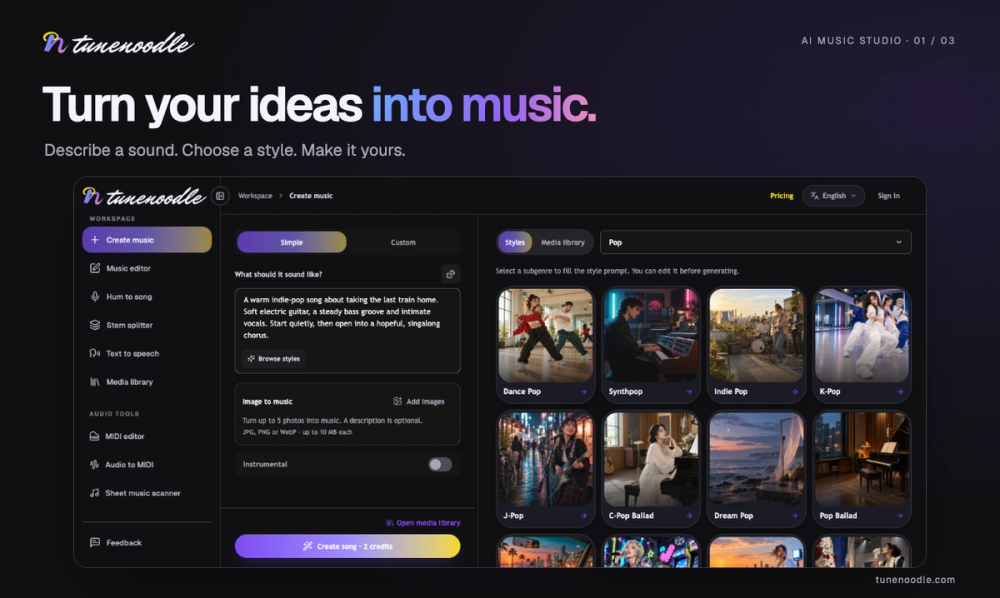
tunenoodle is an AI music studio that turns ideas into finished songs. Describe a mood, story, or lyric, or start from images or a hummed melody, and generate a track with vocals or as an instrumental. Everything you create lands in a private media library for playback, download, and further editing.
Key Features
- Text to music – Describe subject, mood, rhythm, and instruments, or reuse a style template prompt.
- Lyrics and vocals – Write your own verses and choruses or revise an AI draft, then choose a vocal style or go instrumental.
- Image to music – Add up to five images and turn a visual mood into a soundtrack.
- Hum to song – Record or upload a hummed melody and develop it into a full track.
- Stem separation – Split vocals, drums, bass, and other instruments from uploaded or generated audio for practice, remixing, or mixing.
- Song mashup – Combine two reference tracks into a new piece inspired by both.
- Extend and replace section – Keep shaping an existing song by extending from a chosen point or regenerating a passage.
- Private media library – Store generated songs and uploaded audio together, filter by title, source, and favorites, and use tracks as sources for edits.
Free Audio Tools (No Account)
A suite of browser-based tools runs locally without sign-in or credits:
- BPM Tapper with metronome and delay calculator
- Slowed + Reverb with 16-bit WAV export
- Audio speed & pitch changer (slow down without changing key, transpose without changing tempo)
- Chord progression generator
- MIDI editor, audio to MIDI, sheet music scanner, MusicXML player
- Audio chord analyzer, spectrum & pitch analyzer, stereo phase check
- Smart silence remover, dynamics workbench, ear training, tone & sweep generator, audio trimmer
How It Works
- Describe your song – Provide a prompt, lyrics, images, or a hummed melody.
- Sign in and submit – Check settings and credit cost, then submit.
- Play it back and keep it – Listen and download from your library, or keep editing.
Pricing
Creating, playing, browsing templates, and all local audio tools are free. New accounts receive starter credits. Downloading saved songs requires a purchased credit pack (one-time, never expires) or an active membership. Generation shows its credit cost before submission.
Target Users
Songwriters, producers, hobbyists, and content creators who want to sketch musical ideas quickly, generate full tracks from simple inputs, or use lightweight audio utilities without installing software.


