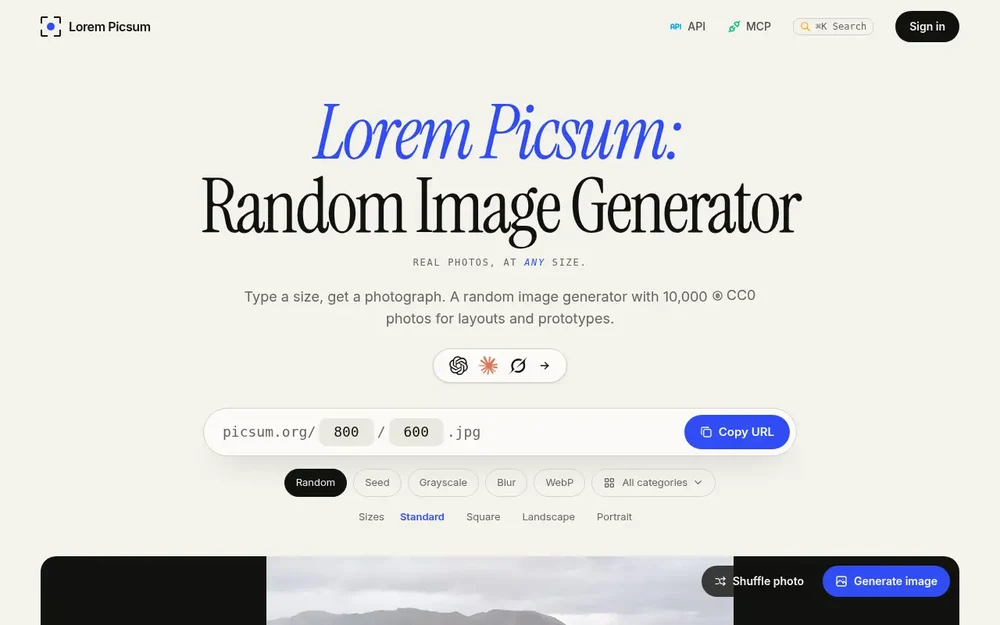
Lorem Picsum as a random image generator
Lorem Picsum is a random image generator that supplies real CC0 photographs for layouts, prototypes, demos, and tests. Designers and developers can choose a photo, set its dimensions, and use a link or download the result. Rather than filling an unfinished interface with grey boxes, they can see how actual photographic content sits in a card, hero area, gallery, or other layout. The collection contains 10,000 photos, and the site provides a visual generator as well as URL-based access through its image API.
The basic workflow is direct: specify a width and height, then let the generator return a cropped photograph at those dimensions. The image is not stretched to fit. A square can be requested with one size value, while two values describe a landscape or portrait crop. The site’s preview lets you shuffle to another selection, inspect the photo’s ID, dimensions, format, and CC0 status, then copy its link or download it. This makes the service useful both for quickly filling a design and for selecting a particular image to reuse.
Browse photos and choose a crop
The contact sheet offers a way to explore the collection before settling on a result. Photos can be browsed by category or tag, with categories such as landscapes, architecture, animals, food, and textures shown on the site. Search by tag and the photo records can help narrow the selection to a subject that suits a mockup. The collection page also displays photo IDs and creator credits, and links to photo information are available when you want to inspect an individual record.
Once you have a suitable source photo, the generator can crop it to the size needed by the layout. For example, a square tile, a wide content block, or a portrait can each use their own width and height. The API supports dimensions from 1 to 2,000 pixels. Because the crop fills the requested dimensions, it gives a more realistic view of the composition than a blank placeholder, while allowing the layout to determine the image’s displayed size. For browser use, the site recommends specifying width and height in the HTML so space can be reserved while the image loads.
Use image URLs in a project
Picsum’s image API uses a URL path containing the requested dimensions. A URL can be placed directly in an HTML image element or opened in a browser; the site also provides code examples and options for copying a URL or Markdown for AI. The API requires no key or sign-in for its basic access, so a developer can add a photo to a page without setting up credentials. Width and height in the path specify the output size, and one dimension value requests a square.
For more control over what appears, a tag can specify a subject and a category can narrow the selection. The same filters can be used with the photo-list endpoint to browse matching records. These URL parameters make it possible to use a subject-relevant photograph rather than simply accepting any image from the collection. The site’s documentation includes examples for HTML, CSS, React, and curl, and describes using URLs in a browser, build tool, or test runner. Developers can therefore start with a simple image link and consult the reference for more specific selection needs.
Make results repeatable or adjust their appearance
A plain random URL may return a different photograph on another request. When a mockup or test needs a consistent result, add a seed to select the same source photo again. A seed can also function as a subject word; if it matches no tag, the service falls back to a stable selection from the collection. A category can narrow the available pool, and an information endpoint can show which photo a seed selects. If you need to pin a known photo, an ID-based URL is another option described by the site.
The URL can also request grayscale or blur effects. Grayscale helps preview a layout without color, while blur can be useful when evaluating text over an image or testing a loading skeleton. Blur accepts an integer from 1 to 10, and the effects can be combined. JPEG is the default format; adding the WebP extension requests WebP instead. These choices can be kept in the image link, so the requested format and effects apply to both the served image and the downloaded result. Seeds, crop dimensions, and format can be adjusted independently according to the examples in the API documentation.
Where Lorem Picsum fits
A random image generator is especially practical while a design is still taking shape. In wireframes and prototypes, real photographs help reviewers judge the balance between image and text. In component libraries and Storybook stories, a seed can keep an image stable across rebuilds. For screenshot or visual testing, consistent seeds and exact dimensions provide a repeatable image fixture. Documentation, tutorials, demos, and starter templates can also use a one-line image URL to show a page with photographic content.
The same workflow can support development tools that need example imagery. The site offers API documentation that can be copied as Markdown and describes connecting coding assistants over MCP. These are ways to make the documented photo service available in those workflows; they do not change the underlying task of choosing and serving a photograph. For published work, the site says the collection photos are CC0 and links to source records and creator credits. Users can inspect those records and credit authors, as shown on the site.
Practical details before you use it
Choose a random URL when variety is useful, such as checking how a layout responds to different subjects. Use a seed when the same image should appear again, or an ID-based URL when you have chosen a specific photo. Use a tag or category when the subject matters, and select JPEG or WebP to match the format you want to test. The site supports copying the generated link and downloading the photo, giving you a choice between referencing an image URL and managing a downloaded asset alongside a project’s other files.
There is an important distinction between the site’s presets and custom generation: its FAQ says the presets are free and do not require sign-in, while a custom size, grayscale, or blur costs one credit per photo and size when generated through the signed-in site, MCP server, or an API key. Without one, a request returns the nearest preset. The FAQ also notes that if processing is temporarily unavailable, a preset with effects turned off is an alternative. These details make Lorem Picsum straightforward for placeholder imagery while clarifying what to check when a workflow depends on custom dimensions or effects.