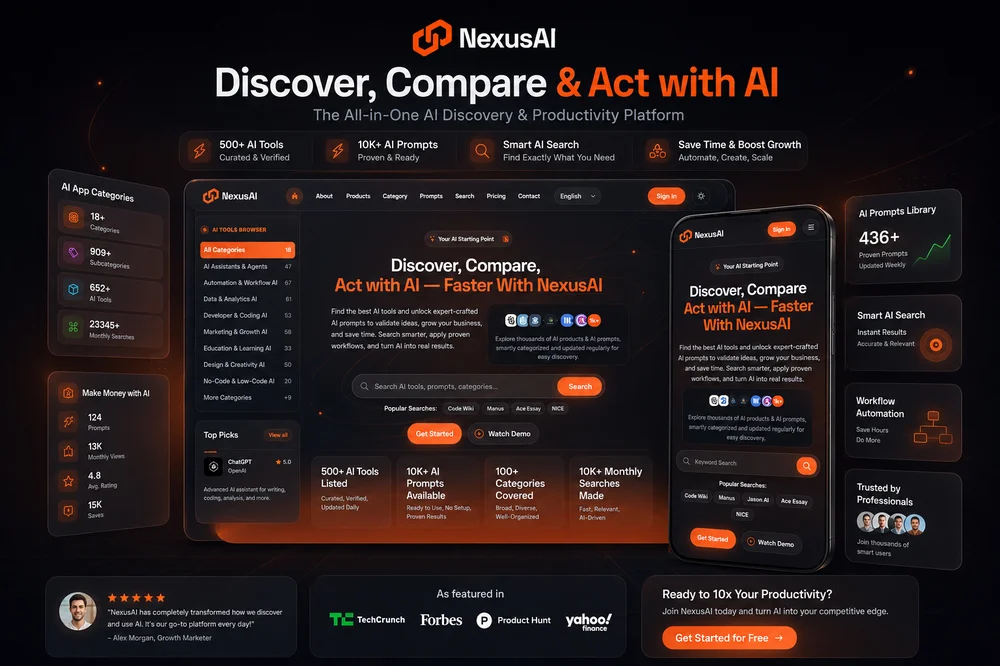
NexusAi helps people discover and compare AI tools, AI-powered software, and SaaS products with AI features. It brings product listings, categories, prompts, search, and AI industry insights together in one place. Rather than offering a single AI application, NexusAi is a discovery resource for exploring options across different kinds of work. Its homepage highlights products and groups them by category, giving visitors several ways to begin when they have a task in mind but have not settled on a tool. The site also presents practical prompts and workflows alongside product discovery, connecting the question “What could I use?” with “How might I approach this task?”
The directory includes software across areas such as writing, design, video, development, automation, marketing, analytics, and productivity. Its scope includes both dedicated AI products and software that has built-in AI features. That breadth makes NexusAi useful as a starting point for exploring a field, as well as for looking for a product around a particular kind of work. The site describes its listings as curated, verified, and regularly updated; visitors can use the directory to investigate options, while checking individual product details to decide what fits their needs.
The product area is the central place to browse AI applications. NexusAi features selected products, sponsored placements, and monthly or trending highlights, as well as a broader listing accessible through its AI tools page. These different entry points help distinguish between editorially highlighted selections, promoted products, and the wider catalog. A highlighted placement is not the same as a recommendation tailored to an individual visitor, so people comparing options should consider the listing information and follow through to the product that interests them.
Comparing products can begin with the task rather than a brand name. Someone exploring meeting support, for example, can look for products described as note-taking or transcription tools; someone seeking a creative application can browse image or video listings. Product cards on the homepage provide short descriptions and category context, and some display a rating. This can help with initial orientation, but the short summaries are only a first look. A sensible next step is to open the relevant product listing and review its details before deciding whether it addresses the task in question.
Browse categories or search by need
NexusAi provides a search entry point and organizes products into categories, so visitors can approach discovery in more than one way. Search is useful when a person already has a specific tool type or task in mind. Category browsing is helpful when the need is broader, or when it would be useful to see the range of software grouped around a field. The site’s category directory offers sorting options including Popular, Most Tools, and A–Z, which provide different ways to navigate its category collection.
A practical approach is to describe the job in plain terms, then use the closest search or category route available. For instance, a visitor considering AI for development can explore developer and coding listings, while someone looking for support with written material can start in writing and text. These examples reflect the kinds of areas represented on the site, not a guarantee that every precise task has a matching product. When the first search is too broad, narrowing the task or exploring a related category can help surface alternatives. NexusAi also identifies AI Search as a distinct part of its navigation for visitors who want a search-focused route.
Use prompts and workflows as starting points
Alongside its product directory, NexusAi offers a prompt collection and describes prompts as ready to use without setup. The homepage states that more than 1,000 prompts are available. Prompts can provide a starting point for expressing a request to an AI application, while workflows can help people think through how to apply AI to a task. The site presents these resources as practical complements to finding tools, rather than as a substitute for choosing and using an appropriate product.
A visitor might first identify a task, browse for a tool that appears relevant, and then consult a prompt or workflow for ideas on how to begin. Alternatively, someone already using an AI application might explore prompts to find a more structured way to frame a request. Treat examples as starting material: the wording and process may need adjustment to fit the particular tool, context, and desired output. NexusAi’s homepage refers to prompts for validating ideas, growing a business, and saving time, but it does not establish that every prompt applies to every product or guarantees a particular result.
Explore examples and industry insights
Featured and popular listings give visitors a view of the variety represented in the directory. The homepage includes products described for work such as knowledge management, reception and scheduling, document extraction, software development, visual design, and video creation. These examples illustrate the range of applications cataloged; they are individual products, not capabilities provided by NexusAi itself. Keeping that distinction clear is useful when browsing: NexusAi helps people find and assess software, while each listed product has its own features and terms.
The site also has an AI Insights area, alongside its product, category, prompt, and search sections. This gives visitors another route for exploring AI-related material beyond individual application listings. Someone researching a new area might start with a category, review a few relevant product summaries, and then consult insights or prompts for additional context. The homepage does not specify the contents of every insight or prompt, so visitors should open those sections to see what is currently available rather than assume a particular topic or format.
A considered way to use NexusAi
For a useful search, begin by stating the job to be done and any important requirements in concrete terms. Browse the corresponding category or search for the tool type, then compare the descriptions of relevant listings. Separate sponsored placements from other directory entries, and treat homepage highlights as discovery aids rather than proof that a product is the best fit. If a prompt or workflow seems relevant, use it as a starting point and adapt it to the product and task. Finally, verify capabilities and practical details in the product’s own information before committing to a choice.
This process suits people who want a broad overview of AI software, are investigating options in a particular category, or want prompt ideas alongside product discovery. NexusAi’s role is to organize routes into a varied catalog and make those resources easier to explore. It does not replace product-specific evaluation: the right choice depends on what an individual tool actually supports and on the visitor’s requirements. Used with that distinction in mind, NexusAi can help turn an open-ended search for AI software into a more focused process of discovery and comparison.