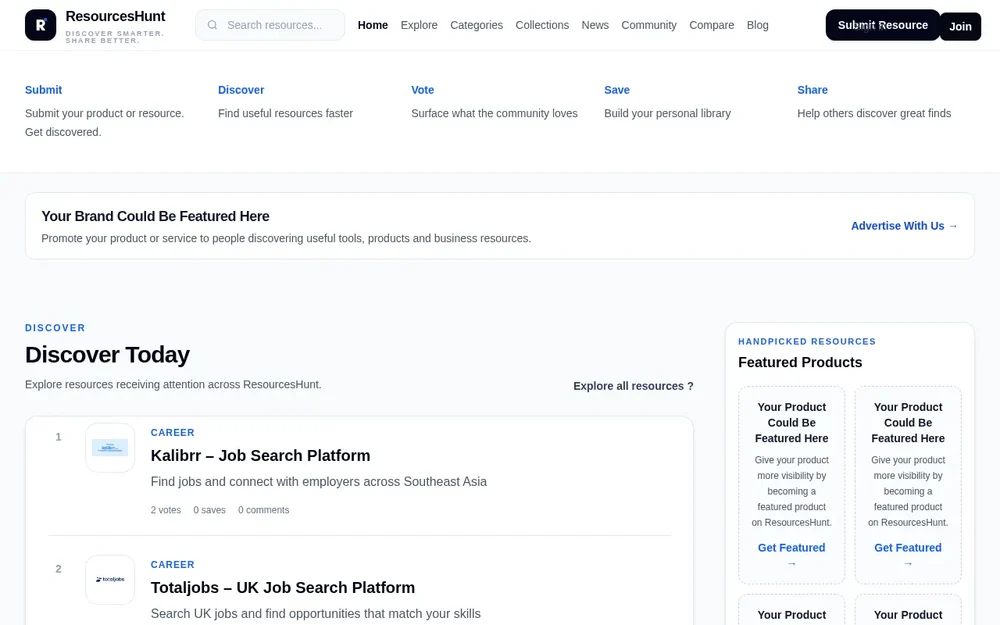
ResourcesHunt for resource discovery
ResourcesHunt is a resource discovery directory for people looking for useful websites, tools, courses, platforms, and other finds across the web. It brings individual resources together in one place and gives visitors ways to discover what is available, notice what others are responding to, and contribute finds of their own. The site describes its purpose as helping people discover, save, vote for, discuss, and share useful resources. That combination makes it more than a collection of links: browsing is paired with community participation and personal saving.
The directory covers a wide range of topics rather than focusing on a single profession or type of product. Its home page highlights examples from careers, education, design, and business, while its category index also includes AI, data analytics, programming, finance, and more. A visitor can start with a broad interest, look through the featured discovery areas, or follow a specific topic to explore resources listed there. ResourcesHunt is therefore suited to general-purpose discovery, whether someone arrives with a subject in mind or wants to see what has recently been added.
Explore resources by topic and timing
ResourcesHunt provides several routes into its listings. The Explore area is presented as a place to find resources, and the home page points to views for all resources, new additions, trending items, and the most-saved resources. These views offer different starting points: a broad listing when the goal is to browse, recently approved entries when looking for new additions, and community activity when seeking resources that have attracted attention or saves. The directory’s landing page also features resources receiving attention, recent additions, and trending examples.
Categories provide another way to narrow a broad collection. The supplied category descriptions cover areas such as AI tools and productivity resources, developer tools, design tools and assets, business resources, courses and learning platforms, and career-related tools and opportunities. Someone who knows the topic they want can use the relevant category as a starting point instead of scanning unrelated subjects. The homepage’s category links and the separate categories page make these topic routes visible. ResourcesHunt presents this organization as a way to browse; the available information does not establish more specific search filters or sorting controls.
Listings can show votes, saves, and comments, and ResourcesHunt includes dedicated sections for trending and most-saved resources. These community signals can help visitors notice which entries people are engaging with or choosing to keep for later. They are useful as discovery cues, not as a guarantee that an item will suit a particular need. A resource’s fit still depends on its own purpose and details, so the directory’s listing and community response are starting points for further evaluation rather than a substitute for reviewing the resource itself.
The homepage presents examples with short descriptions, category labels, and links to their individual resource pages. In practice, a visitor can use these summaries to decide what to open next, then visit the linked resource for more information. A vote or comment offers a way to participate around a listing, while a save helps keep an item in a personal library. The site explicitly describes saving as a way to build that library. These small actions support ongoing discovery: visitors can respond to resources they encounter and keep track of finds that they may want to revisit.
Save, discuss, and share useful finds
ResourcesHunt combines browsing with tools for community contribution. Visitors can save resources, vote for them, discuss them, and share them with others. The site’s Community area and its How It Works page are additional entry points for learning about participation. Rather than treating discovery as a one-way activity, the directory invites people to help make its collection more useful by contributing resources and taking part in the community.
A practical way to use the site is to browse a topic or discovery view, open promising listings, and save entries worth returning to. Visitors can then use the community features to respond or share a relevant find. This is a suggested workflow based on the actions the site describes; the source does not specify further collaboration or library-management features. The emphasis is on straightforward discovery and contribution, not on claiming a particular process for reviewing, organizing, or recommending every resource.
Submitting a resource and keeping up with updates
People who know a useful tool, website, course, platform, or other resource can submit it through the Submit Resource flow. ResourcesHunt says that submitted resources can help grow the directory, and its Recently Added section describes the latest entries as approved resources. This indicates a submission and approval step, though the available page does not explain its review criteria, timing, or outcome for any individual submission. For contributors, the key function is clear: suggest a resource for others to discover, rather than merely sharing a link privately.
The site also has a News section for updates and developments, alongside its main resource listings and blog. This gives visitors another route to new material, separate from browsing tools and other resources. Collections, community pages, and a Compare section are also linked in the site navigation. The homepage confirms that these sections exist, but does not give enough detail to describe how collections are assembled or how comparisons work. Visitors interested in those functions can explore the corresponding pages directly rather than assume capabilities beyond what is shown.
Choosing a starting point
ResourcesHunt is most useful when you want a broad directory to explore, a topic-based route to relevant listings, or a community-supported way to surface and retain useful finds. Start with a category if you have a subject in mind; choose a view such as new, trending, or most saved if you want a different discovery angle. Read the individual listing summary, follow its link for details, and use saving, voting, discussion, or sharing where appropriate. These options serve different purposes: discovery exposes resources, community responses add context, and saving helps with later reference.
The directory’s broad scope is also an important consideration. Examples and categories span multiple domains, so visitors should use the topic structure and each resource’s own information to assess whether a result fits their requirements. ResourcesHunt does not present itself on the captured page as a single specialist tool; it is a place to discover and contribute many kinds of resources. Whether you are browsing casually or arriving with a specific area of interest, its central workflow is to find useful entries, explore their details, and help others discover worthwhile finds.