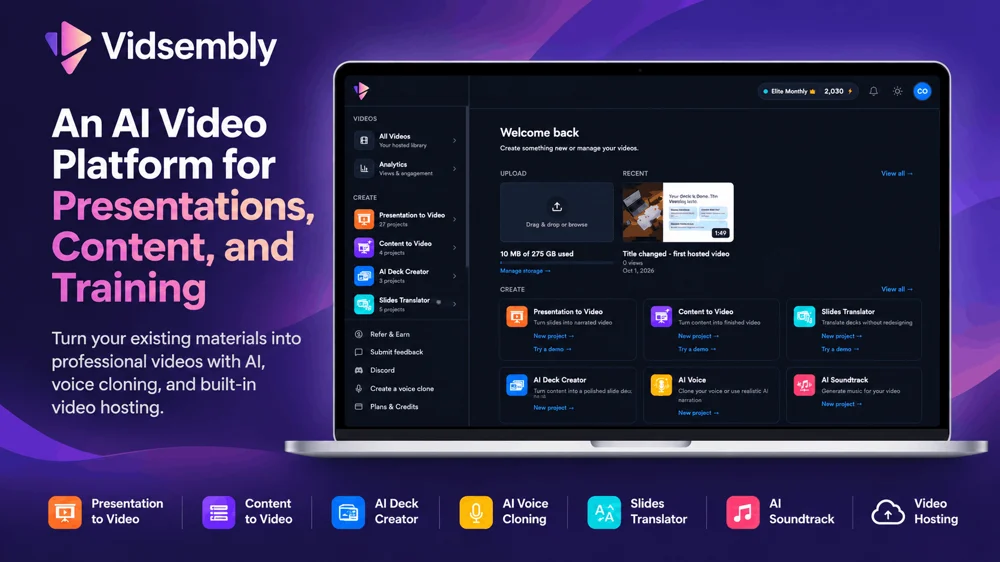
Vidsembly is an AI-powered video creation platform designed to help businesses, educators, and content creators turn existing materials into professional videos. Instead of spending hours recording narration, rebuilding presentations, or learning complicated video editing software, users can upload their files, customize the output, and generate finished content through simple, guided workflows.
The platform brings together AI video generation, presentation creation, voice cloning, transcription, slide translation, soundtrack generation, and video hosting. Its tools are designed to work independently or as part of a broader content creation process, helping teams produce more content from the materials they already have.
Turn PowerPoint Presentations into Videos
One of Vidsembly's core features is Presentation to Video, which converts PowerPoint presentations and PDFs into narrated MP4 videos.
Users can upload an existing presentation, import speaker notes or generate narration for individual slides, and refine the script before producing the video. Vidsembly then combines the original slides with AI-generated speech to create a presentation video.
Users can choose from a library of AI voices or use their own cloned voice for narration. Multiple languages are supported, making the tool useful for organizations producing training materials for international audiences.
This workflow is especially valuable for businesses that already have large libraries of PowerPoint presentations but want to distribute the information as videos. Rather than recording each presentation manually, teams can reuse existing slides and produce narrated content more efficiently.
Create Videos from Documents and Written Content
Vidsembly also offers Content to Video, which transforms documents, notes, and written content into narrated presentation videos.
Instead of starting with a finished slide deck, users can provide their source material and have Vidsembly generate presentation visuals and narration as part of a guided process.
This makes it possible to repurpose articles, internal documents, educational materials, and training resources into video content without manually building every slide.
For teams that regularly publish instructional or informational content, this provides a practical way to reuse existing written materials across additional formats.
AI Presentation Creation
The AI Deck Creator helps users turn written information into editable PowerPoint presentations.
Users can provide text or documents, select presentation preferences, and generate slides that can be downloaded and edited.
The resulting presentations can be used independently or brought into Vidsembly's Presentation to Video tool to create narrated videos.
This provides a workflow from written content to presentation to finished video, reducing the number of separate applications needed to create training and educational materials.
AI Voice Generation and Voice Cloning
Vidsembly includes AI voice tools for generating narration without recording audio manually.
Users can select from available AI voices, generate spoken audio from a script, or create a custom voice clone for more personalized narration.
Voice cloning is particularly useful for educators, trainers, and business professionals who want their videos to sound consistent without having to record every script themselves.
Generated narration can be used for standalone audio content or within Vidsembly's presentation and video creation workflows.
Translate Presentations into Multiple Languages
The Slides Translator helps users translate PowerPoint presentations and PDFs into other languages while working to preserve the original presentation design.
This is useful for businesses with international teams, educational institutions serving multilingual audiences, and organizations that need to distribute training materials across different regions.
Combined with multilingual AI narration, Vidsembly can help teams adapt existing presentation content for audiences who speak different languages.
Transcribe Audio and Video Recordings
Vidsembly's Transcriber converts uploaded audio and video recordings into text.
Users can process meetings, interviews, lectures, presentations, and other recordings to generate transcripts that can be reviewed and exported.
This is useful for documentation, content repurposing, accessibility workflows, and creating written reference materials from recorded information.
Instead of manually transcribing lengthy recordings, users can generate text and use it as the starting point for additional content.
Generate AI Soundtracks
The AI Soundtrack tool helps users create instrumental background music for videos.
Users can provide a video or specify a desired length and choose a musical style to generate audio that fits their content.
This is useful for training videos, promotional content, presentations, and other projects that benefit from background music without requiring users to source and edit audio manually.
Host, Share, and Track Videos
Vidsembly also includes built-in video hosting, allowing users to manage and distribute their finished videos without immediately moving to another platform.
Users can upload videos or publish content created with Vidsembly, generate shareable watch links, and embed videos on websites.
Video analytics provide insight into viewing activity, helping teams understand how their content is being accessed.
This is especially useful for organizations creating employee onboarding videos, educational resources, product demonstrations, or internal communications that need to be distributed to an audience.
Who Is Vidsembly For?
Vidsembly is designed for a variety of professionals and organizations.
HR and learning and development teams can turn onboarding presentations, compliance materials, and employee training documents into narrated videos.
Educators and instructors can transform lecture slides and instructional resources into video lessons that students can watch independently.
Sales enablement teams can convert product presentations, training decks, and sales materials into shareable videos for internal training or customer communication.
Marketing teams and content creators can repurpose written content, presentations, and existing resources into new video formats.
Internal communications teams can distribute company updates, process documentation, and informational presentations through videos rather than relying exclusively on written documents.
A Simpler Approach to AI Video Creation
Vidsembly focuses on practical content creation workflows rather than requiring users to learn a traditional video editing timeline.
Each tool is designed around a specific task, such as converting a presentation into a video, generating a voiceover, translating slides, or transcribing a recording.
Users can work with their existing materials and generate downloadable outputs without rebuilding everything from scratch.
The platform also provides free browser-based utilities for everyday audio and video tasks.
Pricing and Getting Started
Vidsembly offers a free plan with introductory credits and no credit card required. Users can explore its tools, create projects, and test AI-powered content generation before subscribing.
Paid plans provide additional monthly credits, premium voice options, expanded video hosting storage, and other capabilities for users who need to create content more frequently.
Whether someone needs to convert a single PowerPoint presentation into a video or build a repeatable content creation workflow for an organization, Vidsembly provides a collection of tools for creating, managing, and sharing video content.
Visit https://www.vidsembly.com/ to explore the available tools and get started.