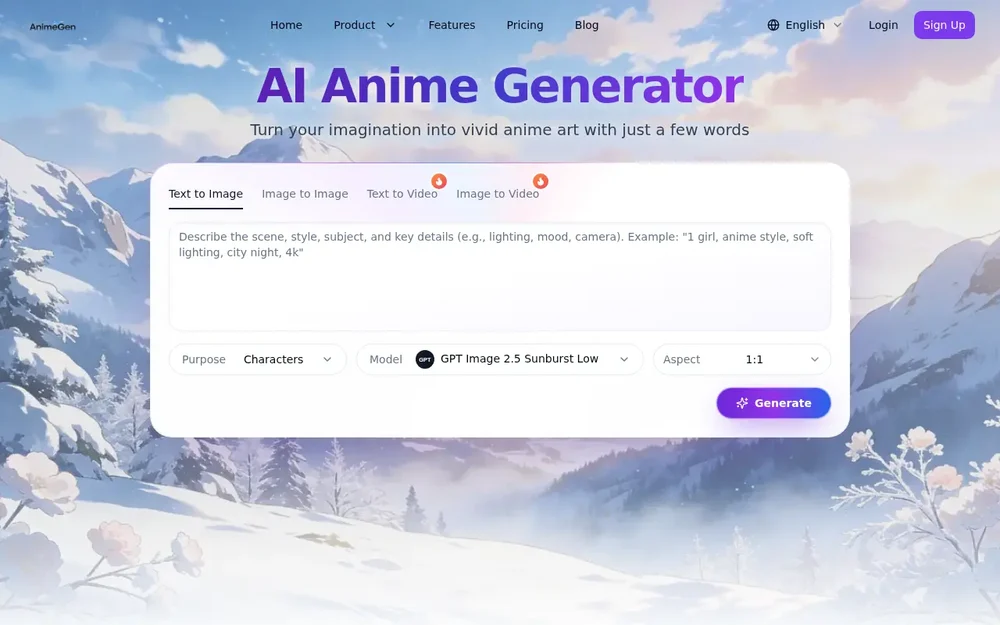
What AnimeGen does
AnimeGen is an online anime image generator for people who want to turn a written idea into anime-style artwork. Enter a description, choose a model and an aspect ratio, then generate an image to review and download. The workflow is aimed at both quick experiments and more considered creative concepts: a prompt can describe a character, a setting, or the mood and appearance of a scene. The site presents text-to-image as its primary mode and also shows an image-to-image option. Its examples include character art, a Japanese-style interior, and a cyberpunk scene, illustrating that prompts can cover more than portraits.
The generator provides selectable models and aspect ratios rather than a single fixed output format. That gives users a way to shape a generation around its intended composition, such as a portrait or a wider scene. AnimeGen also displays sample prompts and images that can help users understand how descriptions, model choices, and ratios work together. New users can try the service with free credits, according to the site; paid plans are also listed.
Build an image from a descriptive prompt
The prompt is the main creative input. AnimeGen recommends describing the subject, style, lighting, mood, and scene, rather than relying on a vague idea alone. A useful prompt can start with who or what should appear, then add visual details such as clothing, expression, setting, and light. The site’s suggested structure—subject, style, lighting, environment, and mood—offers a practical way to organize those details without requiring a specialized prompt format.
Its examples show how this works in practice. A springtime heroine prompt combines a floral kimono, long hair, expressive eyes, cherry blossoms, pastel light, and drifting petals. A cyberpunk character prompt adds a visor, techwear, neon trim, and a holographic room. For a background, the sample describes a sunlit tatami room with shoji windows and a steaming teapot. These examples are starting points, not guarantees of a particular result. Users can adjust the description and generate again when they want to explore a different visual direction.
Choose a model and composition
AnimeGen lets users choose from multiple image-generation models. The page’s sample workflows associate Animagine with a character portrait, Flux-2-Max with a cyberpunk character, and Seedream-4.5 with an anime background. The generator’s hero interface also displays GPT Image 2.5 Sunburst Low. These are examples of available model choices shown on the page, not a promise that every model will suit every prompt. The site advises selecting a model according to the goal, and its showcase gives users a concrete reference for how a model may be used.
Aspect ratio is another choice that affects the shape of the composition. The interface presents options including square, portrait, landscape, and widescreen formats, while the FAQ notes that supported ratios depend on the selected model. A portrait ratio may be a sensible starting point for a character-focused image; a wider format may better fit a scene or banner-like composition. Users should check the options available for their chosen model, then select a shape that matches how they intend to use the image.
From first idea to downloadable image
A straightforward workflow begins with a clear visual goal. Decide whether the image is primarily a character, a background, or a full scene, and identify a few details that should be visible. Write those details into a prompt, select a model that seems appropriate, and choose an available ratio. AnimeGen’s sample guidance suggests including style and lighting as well as the subject, then adding the environment and mood to give the description more context.
After starting generation, review the result and download it if it fits the intended look. If an important detail is missing or the composition feels wrong, a practical next step is to revise the prompt—for example, clarify the outfit, setting, or lighting—and try again. This is a suggested way to use the prompt-based workflow, rather than a claim that each revision will produce a specific improvement. The site says generation typically takes seconds, depending on the model and system load, and that the interface shows the credit cost before a generation is started.
Creative uses and examples
AnimeGen’s showcased examples point to several kinds of personal creative work. Character prompts can explore clothing, poses, expressions, and visual themes, such as a heroine in a kimono or a futuristic figure in techwear. Scene prompts can focus on atmosphere and setting, using details like a tatami room, shoji windows, warm afternoon light, and a teapot. These approaches can help someone visualize an idea or develop a concept before deciding how to use it elsewhere; the generator itself is presented as an image-making tool, not as a complete story, manga, or design-production workflow.
The site also mentions posters, portraits, banners, and widescreen scenes when describing aspect-ratio choices. Those are useful ways to think about composition, but the appropriate ratio depends on the model’s available options. People exploring different styles can use the sample prompts as references and then write their own descriptions. AnimeGen’s related manga, avatar, wallpaper, and character pages are separate tools listed on the site; this listing focuses on its anime image-generation workflow.
Access and practical considerations
AnimeGen says new users receive free credits to test models and styles. Its pricing page also lists subscription plans with monthly credit allowances, and the FAQ says that credit costs vary by model and are shown in the generator before use. This makes it useful to check the current in-product cost and available ratio before generating, particularly when comparing different model choices. The page describes the service as free to try, but it also presents paid options, so that should not be taken to mean every use is unlimited or free.
The site states that generated images may be used commercially provided use follows its terms and local laws. Anyone planning commercial use should review those terms rather than treating the statement as a blanket guarantee for every project or jurisdiction. AnimeGen also says it filters content that violates its safety guidelines. For someone deciding whether it fits a project, the clearest criteria are whether prompt-based anime artwork is the desired output, whether the listed models and image ratios suit the intended composition, and whether the available credits meet the expected usage. The sample gallery and prompt advice offer a direct way to assess the workflow before committing to a paid plan.