RemakeMeme for personalized video memes
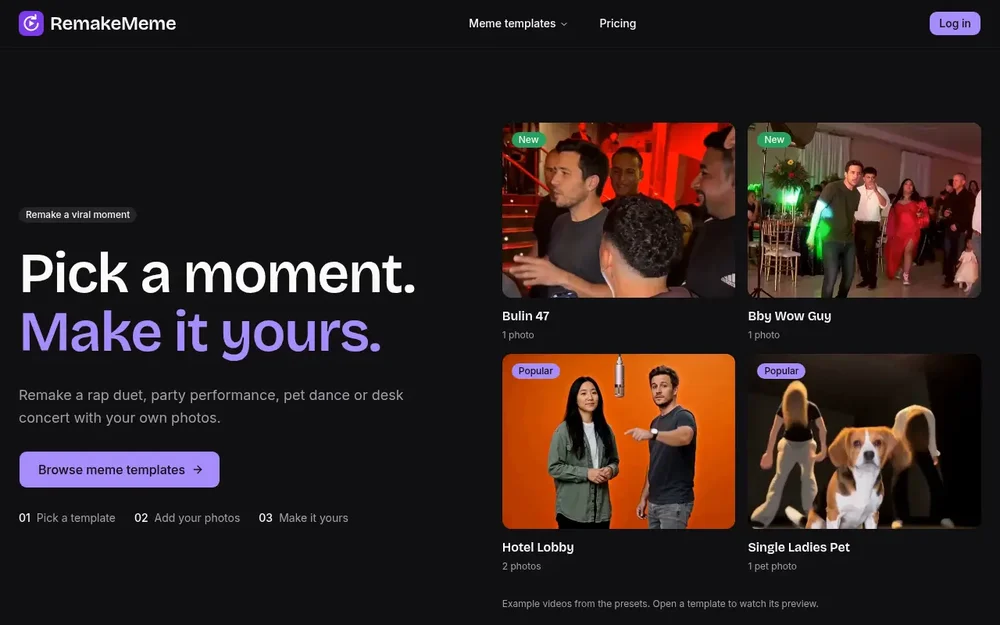
RemakeMeme helps people remake viral videos with AI by placing their own photos into themed video templates. Instead of building a clip from scratch, you choose a moment, add the photo or photos that template calls for, and make a personalized version of its scene. The available examples range from rap and party performances to a pet dance, a desk concert, and holiday gatherings. The result is a short video built around a recognizable setup, with the people or pet in your supplied image cast into the moment.
The homepage presents a simple three-step flow: pick a template, add your photos, and make it yours. You can browse the template collection and open individual templates to watch a preview before choosing. This makes the product suitable for someone looking for a specific meme scenario as well as someone browsing for an idea. Its focus is on personalized remakes of video moments, not a general-purpose video editing workspace described on the page.
How RemakeMeme helps you remake viral videos with AI
Templates provide the scene and determine what kind of photo input is needed. Some call for one photo, while others cast two people or a larger group. For example, Bulin 47 and Bby Wow Guy each use one photo; Hotel Lobby uses two; and Tiny Desk AI accepts one to five photos. Single Ladies Pet is designed around one pet photo. These requirements are shown alongside the template, so you can check them before starting.
The preset also establishes the visual premise. Hotel Lobby places two performers in an orange-booth setting with a hanging microphone. Tiny Desk AI can cast a lead and friends as musicians, and offers an option for holiday lights. In Thanksgiving Toast, a second friend is optional. Ugly Sweater Party can be set up for one person or a pair. These are examples of how the selected template shapes the scene, rather than controls that apply to every remake.
Pick a template for the moment
The collection includes different kinds of performance and comedy setups. Bulin 47 is a red-lit entrance and freestyle scene; Bby Wow Guy centers on a party entrance and a camera-facing expression. Burning Bridges features party gestures, while Single Ladies Pet puts a pet at the center of a dance routine with two backup dancers. Tiny Desk AI offers a band-style scene, and Thanksgiving Toast and Ugly Sweater Party provide seasonal alternatives. These examples give the catalog variety without requiring you to invent the setting yourself.
A practical way to browse is to start with the person or animal you want to feature, then look for a template whose scene fits. If the idea involves two friends, Hotel Lobby or a template with an optional second person may be a better match than a solo setup. If you want a pet-centered clip, Single Ladies Pet explicitly asks for a pet photo. For a group performance, Tiny Desk AI accepts as many as five photos. Checking the preview and listed photo count helps you decide whether a preset matches the moment you have in mind.
The templates specify both photo counts and sample output details. Listed clips are five to fifteen seconds long, while the default aspect ratio varies by preset. Bulin 47 and Single Ladies Pet list a 9:16 default; Bby Wow Guy and Burning Bridges list 16:9; and Hotel Lobby lists 4:3. Tiny Desk AI, Thanksgiving Toast, and Ugly Sweater Party list 9:16. These details are useful when choosing a scene, particularly if you have a particular format or number of people in mind.
The source describes the examples as videos from presets and invites visitors to open a template to watch its preview. It does not describe every production setting or promise identical results for every input, so the preview and the template’s own requirements are the clearest guides to what a specific remake is intended to look like. Start with the photo count and subject called for by the preset, then use its scene description to judge whether your image fits the intended role.
A straightforward creation workflow
To make a clip, browse the meme templates, choose a scene, and provide the required photo or photos. The template descriptions explain the casting: one person may take the lead, two people may fill separate performer roles, or a pet may star in the scene. Then use the selected preset to create the personalized version. The homepage frames this process as choosing a moment and making it yours, with no requirement to plan a location or assemble the scene represented in the preset.
For instance, someone making a small band scene could review Tiny Desk AI, decide whether to use one portrait or cast more of the group, and consider whether to turn on its holiday-light option. Someone making a dinner-themed clip could select Thanksgiving Toast and choose whether to include the optional second friend. These examples illustrate how to make a choice based on the template’s documented options; they do not imply that every template offers the same adjustments.
Choosing the right remake
RemakeMeme is most relevant when you want a short, template-led video featuring yourself, friends, or a pet in a familiar performance or party scenario. The catalog descriptions help distinguish those scenarios, and the listed photo counts, clip lengths, and default ratios provide concrete details to compare. If you already have a particular meme moment in mind, browse for its matching template. If not, the collection’s previews and scene summaries offer a way to find a starting point.
Before selecting, consider who should appear and whether you have the number of photos the template requests. Then check the preview and default format to see whether the preset suits your intended clip. RemakeMeme’s stated workflow centers on these templates and submitted photos, making it a focused option for creating personalized video remakes rather than a blank-canvas production process. The supplied page lists a range of scenes but does not specify broader editing controls, so template descriptions are the best source for understanding each available setup.