What AI Baby Generator does
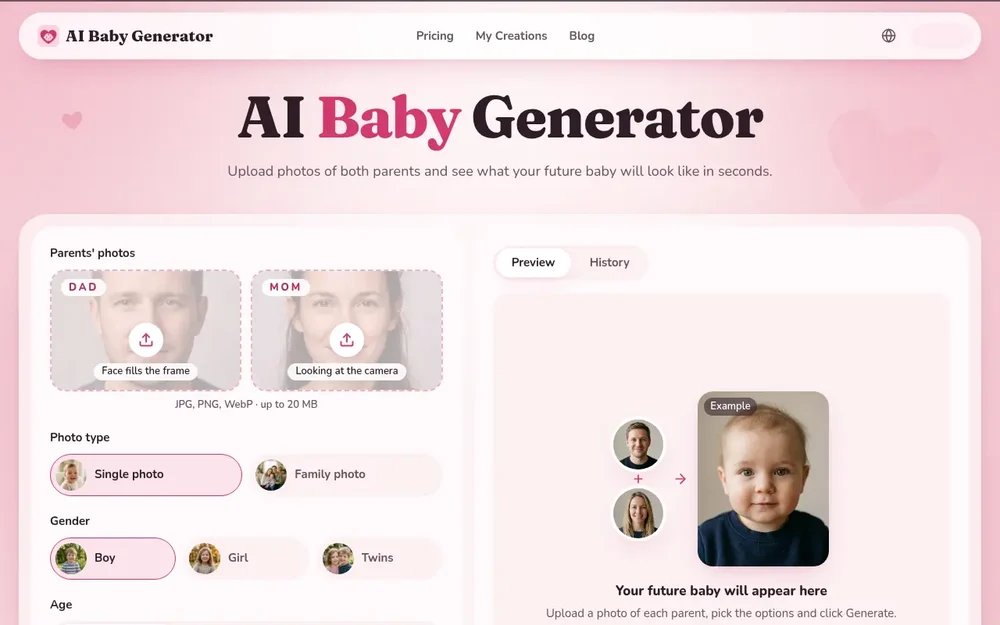
AI Baby Generator creates imaginative images of a possible future child from photos of two parents. It is intended for curiosity and entertainment: the service combines visible facial features to make a baby, child, or teen portrait, rather than predicting a real child’s appearance or using genetic information. People can use it to explore different image options, compare a single-child portrait with a family scene, or make a short animated clip from a generated photo.
The process starts with one photo of each parent. After uploading, users select the image format and the options they want to preview, then generate a result. The tool runs in a web browser on a computer or phone, so there is no app installation requirement. Its central purpose is straightforward: turn two parent photos and a few choices into a playful visual keepsake.
Uploading photos and choosing a workflow
For a starting point, AI Baby Generator accepts JPG, PNG, and WebP images up to 20 MB. The site recommends a clear, front-facing photo of each parent, with faces well lit and easy to see. Solo photos help avoid confusion about whose face should be used. Sunglasses, hats, masks, and heavy filters can obscure facial details, so the site advises choosing images without them.
Once both photos are ready, choose between a single photo and a family photo. A single image focuses on the generated child; the family option places the child with both parents in one scene. On a computer, a QR code can be used to upload photos from a phone. A practical approach is to start with the clearest available parent images, make a first generation, and then adjust the selected options to explore other versions.
Baby, child, teen, and family image options
The settings let users select Boy, Girl, or Twins, and choose an age category: Baby, Child, or Teen. These controls offer different imaginative scenarios from the same two parent photos. For example, a user might compare a baby portrait with a teen image, or see how the selected gender option changes the generated result. The site also presents example outputs for baby boys, baby girls, twins, children, teens, and family photos.
The options are useful for browsing variations, not for establishing what a future child will look like. The generated images are AI-created interpretations of visible features such as hair, eyes, skin tone, and facial shape. They are not evidence of inheritance or a reliable forecast. Treating the settings as creative choices helps set appropriate expectations: the goal is to see possible visual variations, rather than receive a scientific or medical result.
From generated portrait to shareable clip
After choosing the desired settings, users select Generate. The site says photos are created in seconds and offers a preview and history for results. Generated images can be downloaded in full resolution; the page describes downloads as watermark-free. Users may also scan a QR code to save a result to a phone, which can be convenient when the initial upload and generation happen on a computer.
For a moving version, the Animate option turns a generated photo into a short video with sound. The site describes video creation as taking a few minutes. This gives users two kinds of output to consider: a still image for a portrait or family scene, and a brief animated clip. If choosing between them, start with the photo format that best fits the idea; animation is an additional step after a photo has been generated, not a substitute for selecting the image settings.
Getting clearer results and managing creations
Photo quality begins with the source images. Choose one well-lit, front-facing photo per parent, with the face unobstructed and large enough to see clearly. Natural daylight or a bright room can make visible details easier for the generator to interpret. Avoid group shots, cropped couple selfies, and strong filters when possible. These are practical input guidelines from the site; they do not guarantee a particular result, but they help provide cleaner facial references.
The page includes a history area for viewing or downloading results. It says users need to sign in to keep their baby photos, and describes generated images and parent photos as private within the account, with deletion available. People sharing sensitive family pictures may want to review the service’s privacy information and account controls before uploading. The browser-based workflow supports both phone and computer use, and a QR code can bridge the two when moving source photos or finished results between devices.
Setting expectations and choosing access
AI Baby Generator is best understood as a playful image generator. The site explicitly notes that it blends visible features from uploaded photos rather than using DNA or genetics, and that real children can look different. Its results should not be used for medical or family decisions. That distinction matters: the images can be entertaining to compare or share, but they cannot establish biological likelihood or promise a specific appearance.
The page lists a three-day trial at $2.99, including five baby photos, followed by a $19.99 monthly Premium plan unless cancelled. Premium is listed with up to 100 photos and 10 video clips each month, plus watermark-free downloads and private generation. The site says cancellation is available through Account → Subscription. Review the current plan terms before starting a trial, especially its duration, price after the trial, and cancellation conditions. For someone who simply wants to explore the concept, the key decision is whether the available photo and animation options are worth the cost; the generated results remain imaginative rather than predictive.